The Problem with Traditional Daily Field Reporting
For many construction companies, daily reporting still looks something like this:
- Supervisors jot notes down throughout the day
- Crew time is tracked separately
- Photos stay trapped on phones
- Issues are logged later (if they’re logged at all)
- Information gets re-entered back at the office
- Reports are completed at the end of the day when details are already being forgotten
Even companies using Acumatica often struggle with the field experience itself.
The result?
- Incomplete reporting
- Delayed updates
- Double entry
- Inconsistent data
- Limited visibility into real-time project conditions
And for Acumatica users, solving this often requires custom screens, custom tables, new reports, or significant development work.
Daily Field Reports (DFRs) are one of the most important operational records in construction. They capture what happened on-site each day: labor hours, subcontractor activity, weather conditions, project progress, delays, issues, and more.
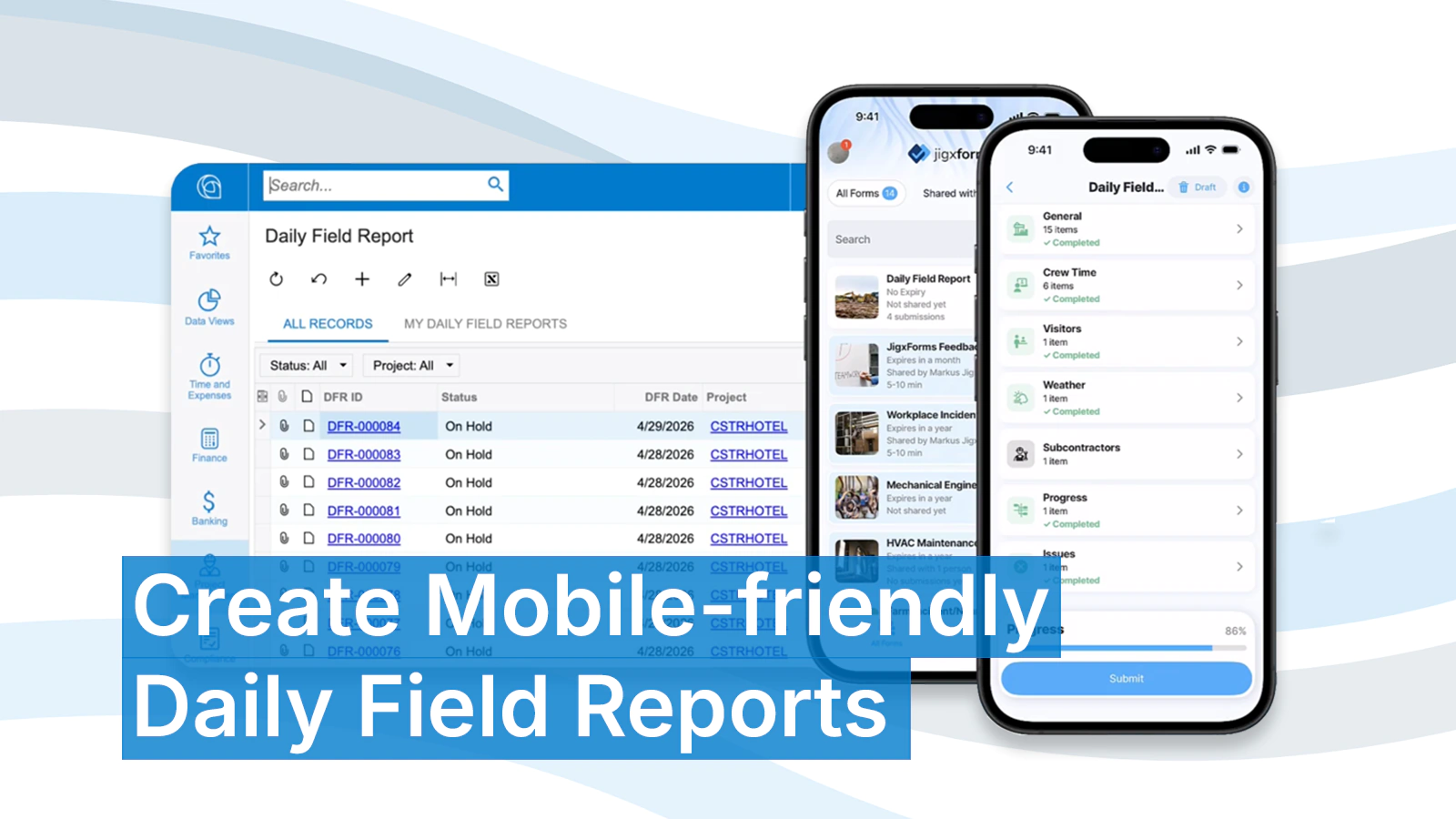
Acumatica Construction Edition already provides DFR capabilities, helping project teams centralize project data and maintain visibility into what’s happening across jobs.
But, there’s one important caveat to DFRs. The people responsible for capturing the information aren’t sitting behind desks; they’re on-site.
And while Acumatica is a powerful ERP, it can be challenging for field workers to make updates from their phones.
That’s where mobile-first workflows become critical.
A Mobile-First Daily Field Report Experience with JigxForms
To improve this process, we built a mobile Daily Field Report preview using JigxForms.
The goal wasn’t to replace Acumatica. The goal was to make Acumatica construction workflows easier to use in the field.
See how in this short DFR overview preview video:
With JigxForms, field teams can complete Daily Field Reports directly from their mobile device using a guided, mobile-first experience designed for how construction teams actually work on-site.
Instead of navigating Acumatica from a browser, users work through a streamlined workflow optimized for mobile data capture.
The form, which can be further customized, is organized into sections including:
- General project information
- Crew time
- Visitors
- Weather
- Subcontractors
- Progress updates
- Project issues
As users complete parts of their DFR throughout the day, their progress can be automatically tracked and saved.
No clipboards.
No disconnected spreadsheets.
No waiting until the end of the day to recreate what happened.
Connected to Acumatica in Real Time
The experience starts by selecting a project from Acumatica.
Once selected, relevant project data is immediately available within the mobile workflow, allowing field users to rapidly capture information tied to the correct project, tasks, and cost codes.
In our working example:
- Crew time entries sync with Acumatica Daily Field Report data
- Project tasks and cost codes are linked directly to entries
- Visitors and subcontractor activity are captured in context
- Weather and progress updates become part of the project record
- Issues can include due dates, schedule impacts, cost impacts, and site photos
Once submitted, the Daily Field Report is available within Acumatica without requiring manual re-entry.
This creates a much tighter connection between the field and the back office.
Built for Real Field Conditions
Construction workflows don’t happen all at once.
A superintendent may start a report early in the morning, add labor updates throughout the day, log an issue in the afternoon, and finalize the report before leaving the site.
That’s why JigxForms supports:
- automatic draft saving
- fast time capture
- mobile photo uploads
- guided completion tracking
The objective is simple: Make it easier for field teams to complete Daily Field Reports consistently, because the best reporting process is the one people will actually use.
Beyond Data Capture: AI Insights for Construction Teams
Most forms tools stop at collecting information.
But construction companies are sitting on valuable operational data hidden across dozens of DFRs.
With JigxForms AI Insights, teams can analyze submission data over time to uncover patterns and risks across projects.
For example:
- What issues are causing recurring delays?
- Which activities are driving unexpected costs?
- Which projects are experiencing repeated weather impacts?
- What unresolved issues are putting schedules at risk?
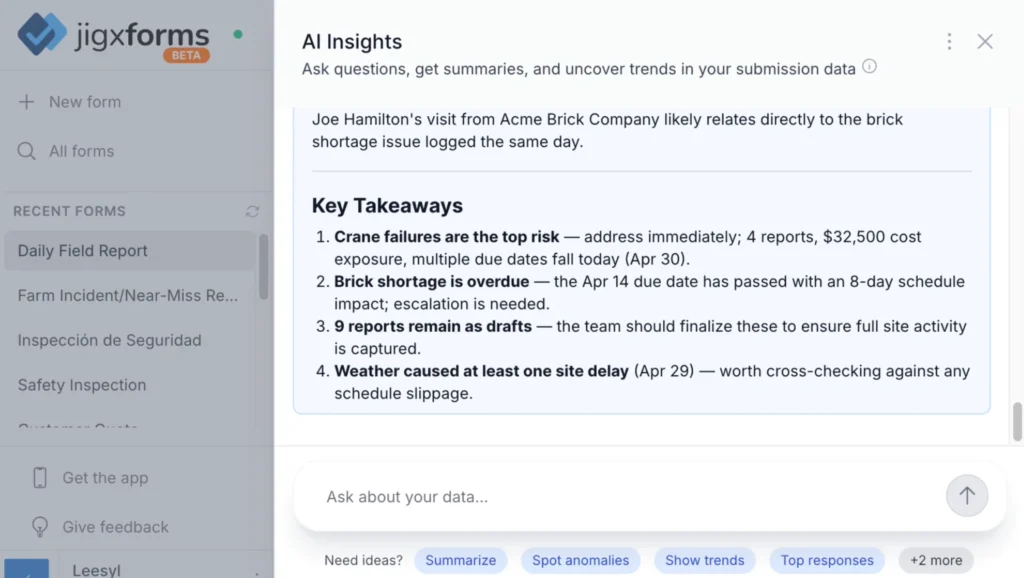
Instead of manually reviewing reports, teams can ask questions in natural language and receive summaries, trends, and key takeaways from their valuable data.
This transforms DFRs from static records into actionable operational intelligence.
A New Opportunity for Acumatica VARs
This approach also opens up new possibilities for Acumatica VARs and technical implementation partners.
Many construction customers want:
- simplified field workflows
- mobile-first data entry
- custom reporting experiences
- connected project workflows
Historically, delivering those experiences often required extensive customization work inside the ERP itself.
JigxForms offers a faster way to build connected field workflows tailored to specific construction processes while still leveraging Acumatica as the system of record.
For example, our DFR preview, uses custom webhooks, JSON, and Make workflows alongside JigxForms to connect field data with Acumatica objects and processes.
For technical Acumatica VARs, this creates an opportunity to deliver highly customized mobile experiences without building entirely custom mobile applications from scratch.
The Future of Construction Reporting Is Mobile and Connected
Construction teams already know DFRs matter.
The challenge is making them fast, usable, and connected for the people working in the field.
Mobile-first workflows can dramatically improve how project information is captured, shared, and analyzed, especially when connected directly to Acumatica.
The result is better visibility, faster reporting, improved accountability, and fewer gaps between the field and the office.
Want to See It in Action?
We’re currently exploring forms and processes like this in the JigxForms beta.
If you’re an Acumatica construction customer looking to modernize field reporting, or an Acumatica VAR interested in building connected mobile workflows for clients, we’d love to talk.
Ready to explore what’s possible with AI-powered mobile forms connected to Acumatica? Contact us today or sign up to try the JigxForms beta.